# MFP E 52645

## Relatório de Consumo

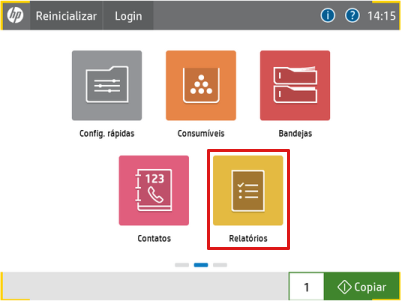
* RELATÓRIOS
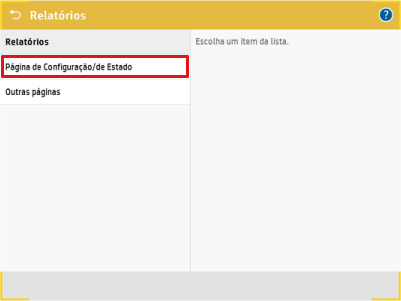
* PAGINA DE CONFIGURAÇÃO/DE ESTADO
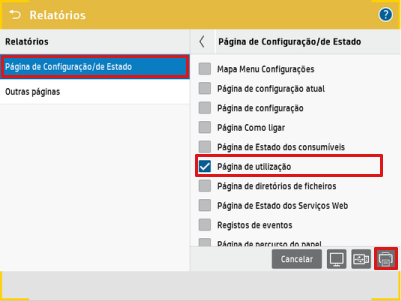
* SELECIONE A PAGINA DE UTILIZAÇÃO
* APERTE O BOTÃO DE IMPRESSORA CANTO INFERIOR DIREITO

<div><figure><img src="/files/hMLr9wSWPTdJ1mMOyVzQ" alt=""><figcaption><p>Vá até o ícone de <strong>Relatórios</strong> </p></figcaption></figure> <figure><img src="/files/CuA5jqGJPjyzEPMxglKX" alt=""><figcaption><p>Selecione <strong>página de configuração/de Estado</strong></p></figcaption></figure> <figure><img src="/files/XeWSCFY70SVGyHeCFCPk" alt=""><figcaption><p>Selecione a <strong>Página de utilização</strong> e aperte o <strong>botão da impressora</strong> no canto inferior direito</p></figcaption></figure></div>

## Site do Fabricante

{% embed url="<https://support.hp.com/br-pt/drivers/hp-laserjet-managed-mfp-e52645-series/20204802>" %}
Drivers&#x20;
{% endembed %}

## Atolamento

{% embed url="<https://www.youtube.com/watch?list=PLoJd2vCjc2jm-5ejZaS8lfRQWovo1Tmho&v=chyJbHOsGTM>" %}
Atolamento HP LaserJet Managed MFP E52645
{% endembed %}

## Digitalização em OCR

{% embed url="<https://www.youtube.com/watch?index=2&list=PLoJd2vCjc2jm-5ejZaS8lfRQWovo1Tmho&v=uHGsDFYaTsA>" %}
Digitalização em OCR HP LaserJet Managed MFP E52645
{% endembed %}

## Troca de Toner HP LaserJet Managed MFP série E52645

{% embed url="<https://www.youtube.com/watch?index=3&list=PLoJd2vCjc2jm-5ejZaS8lfRQWovo1Tmho&v=3ygnDNwA6JI>" %}

## Gramatura do Papel HP LaserJet Managed MFP E52645

{% embed url="<https://www.youtube.com/watch?index=4&list=PLoJd2vCjc2jm-5ejZaS8lfRQWovo1Tmho&v=CZLYgAEn06Q>" %}

## Consumíveis

{% tabs %}
{% tab title="Toner" %}
:art:**CF289A** :art:**CF289X** :art:**CF289Y**

{% hint style="info" %}
Toner preto HP 89A, HP 89X, HP 89Y para rendimento de até 5.000, 10.000 e 20.000 páginas.
{% endhint %}
{% endtab %}
{% endtabs %}

{% hint style="warning" %}
Em caso de dúvidas, entre em contato com a nossa área técnica pelo [WhatsApp](https://api.whatsapp.com/send?phone=5561999483253).
{% endhint %}


---

# Agent Instructions: Querying This Documentation

If you need additional information that is not directly available in this page, you can query the documentation dynamically by asking a question.

Perform an HTTP GET request on the current page URL with the `ask` query parameter:

```
GET https://docs.icondigital.com.br/documentacao/quickstart/hp/mfp-e-52645.md?ask=<question>
```

The question should be specific, self-contained, and written in natural language.
The response will contain a direct answer to the question and relevant excerpts and sources from the documentation.

Use this mechanism when the answer is not explicitly present in the current page, you need clarification or additional context, or you want to retrieve related documentation sections.